
Actions Lite3.9 - Google Play
You'll be able to see results in few seconds.
Publisher Description
AndroidTapp Rating : (4.8/5)
Url:http://www.androidtapp.com/actions-pro/
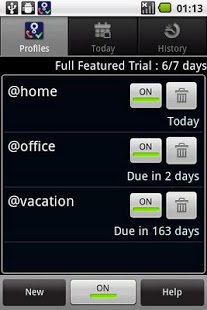
Actions automatically or manually executes a series of actions based on certain conditions, such as time, location, or the launch of an application. Conditions and Actions are organized in a unit called a Profile. A Profile has a set of Conditions and Actions. When all the Conditions in a Profile become true, the Actions are executed. When the Conditions are no longer there, the previous settings are restored. For example, you could set up a profile with the following parameters:
Conditions: App launched--PDF Viewer; Time--7 p.m. to 11 p.m; Location--Home
Actions: Display brightness to max, go into silent mode, set screen timeout to 10 minutes, block all incoming calls, display the reminder "Wear your glasses."
So, if you're at home, it's 7 p.m., and you launch the PDF viewer, all these Actions will automatically occur. Once you close the PDF viewer, leave home, or the time is past 11 p.m., all your normal settings will be restored.
You can set up the following Conditions for a Profile: time, location, app launch, incoming or outgoing call, SMS text, airplane mode, Bluetooth, battery level, docking, headset, external storage, power, screen on/off, USB cord connected, Wi-Fi, and events. From there, you can select from 100 Actions to take place, such as application start/stop, lock screen, answer call, end call, block/divert outgoing call, send/block SMS, reminder, almost all Android phone settings, media, record voice/video, take photo, play audio, and dialogs.
There is no limit to the combinations of conditions and actions to create profiles. With Actions, you'll never forget to have your Android device execute a crucial action.
This is a full featured limited version with an ability to create only two profiles with limited version.
<***Actions can be automated based on the following conditions***>
1)App Launch
2)Events (battery,camera,date,display ,gesture,hardware buttons,system events)
3)Location
4)Phone (incoming call/sms,outgoing call etc)
5)State (airplane mode,bluetooth,battery,calendar event,docking,gps,headset,ext storage,mobile data,mobile network,mobile state,orientation,power,proximity,screen,usb,wifi,wifi connection
6) Time
7)Voice
<***Actions supports taking following actions***>
1)Alert (popup,reminder,vibrate)
2)App (Start/Stop app,launch call log,launch contact favourite tab,goto home screen)
3)Clear data(delete contacts/sms/audio/video/images/accounts/call log,format sd card)
4)Display(custom lock screen,unlock custom lock screen,turn display on)
5)Media (play audio/video,record voice,take pics)
6)Misc (run shell cmd,run sl4a scripts,wait)
7)Phone(answer call, end call (deprecated on android 2.3),block outgoing call,divert outgoing call,make call,send sms,block/forward incoming sms,compose sms/mms/email)
8)Profile
9)Settings
a)Accounts and sync (auto sync,auto sync accounts,start sync,stop sync,add periodic sync,remove periodic sync)
b)Display (brightness,auto brightness,auto rotate,screen time out,stay awake)
c)Security (keyguard lock,visible pattern,tactile feedback)
d)Sound(alarm vol,touch tones,audible sel,bluetooth headset,haptic feedback,incoming call/media/notification/system/ringer volume,mute mic,notification/phone ringtone,pulse notification,screen lock sound,silent mode,speaker,vibrate)
e)Change Wallpaper
f)Wireless controls (airplane mode,wi-fi,bluetooth,data enabled,GPS (works on some devices.works well on rooted device with Actions as system app),Network mode-2g/3g (rooted devices),wifi/usb teethering
10) Settings dialog (all android settings dailogs can be launched)
11)Social
a) Facebook(share status,share photo,share video)
12)Voice (read sms,read text,read site)
Keyword:task,automatically,automatic,time,profile,location,locale,tasker,settings,manager,reminder,lock,forward,profile manager,widget,birthday,sms,email,phone,blocker,robot,lama,EasyProfiles,Setting Profiles,sms,actions
About Actions Lite
The company that develops Actions Lite is SigmaCel. The latest version released by its developer is 3.9.
To install Actions Lite on your Android device, just click the green Continue To App button above to start the installation process. The app is listed on our website since 2013-04-02 and was downloaded 0 times. We have already checked if the download link is safe, however for your own protection we recommend that you scan the downloaded app with your antivirus. Your antivirus may detect the Actions Lite as malware as malware if the download link to com.sigmacel.actionsworksfree is broken.
How to install Actions Lite on your Android device:
- Click on the Continue To App button on our website. This will redirect you to Google Play.
- Once the Actions Lite is shown in the Google Play listing of your Android device, you can start its download and installation. Tap on the Install button located below the search bar and to the right of the app icon.
- A pop-up window with the permissions required by Actions Lite will be shown. Click on Accept to continue the process.
- Actions Lite will be downloaded onto your device, displaying a progress. Once the download completes, the installation will start and you'll get a notification after the installation is finished.
Program Details
System requirements
Download information
Pricing
Version History
version 3.9
posted on 2013-04-02
version 3.9
posted on 2013-04-02
Several fixes and updates
Disclaimer
Official Google Play Link
We do not host Actions Lite on our servers. We did not scan it for viruses, adware, spyware or other type of malware. This app is hosted by Google and passed their terms and conditions to be listed there. We recommend caution when installing it.
The Google Play link for Actions Lite is provided to you by apps112.com without any warranties, representations or guarantees of any kind, so access it at your own risk.
If you have questions regarding this particular app contact the publisher directly. For questions about the functionalities of apps112.com contact us.
